Every product here starts the way client work does: with a real problem. A reseller who sells mostly handbags on Poshmark was building every listing by hand, inside each marketplace’s own form. Cross-posting meant typing it all again and uploading the photos again, and when something sold, remembering where else it was still up. ListingDesk is the desktop app I built for that seller. It prepares the photos on the seller’s own PC, has AI research the item and draft the listing, asks for one review, and then helps post it: it fills Poshmark’s form in the seller’s own Chrome and hands over every other marketplace’s fields ready to paste. The app never clicks the final button. That is the seller’s job, every time.
1. The slow part of reselling
For every item, a reseller has to identify the brand and style, find what it originally sold for and what it sells for now, write a title and a description, measure it, and pick a category, size, condition, and colors. Then the same work goes into a second marketplace’s form, with different fields, limits, and rules, and a third. The photos need attention too: a square crop that cuts off a handbag’s edges costs sales.
So I set the product’s goal around the seller’s day: shoot once, have the app prepare the photos and draft the listing, review it once, and post it to each marketplace with one click per marketplace, with the seller in control of every final publish. The design target for a typical handbag is photos to posted on Poshmark in under five minutes, with no retyping. That is a target for the first real batches, not a measured result yet.
2. Photos prepared on the seller’s own PC
ListingDesk grew out of an earlier photo tool I built for the same seller, and it keeps that tool’s rules:
- SKU cards that sort the shoot. The app prints small QR cards. The seller photographs an item’s card first, then the item, and the app groups the photos by card, so a whole afternoon’s shoot sorts itself into items. Without cards it groups by the time between shots.
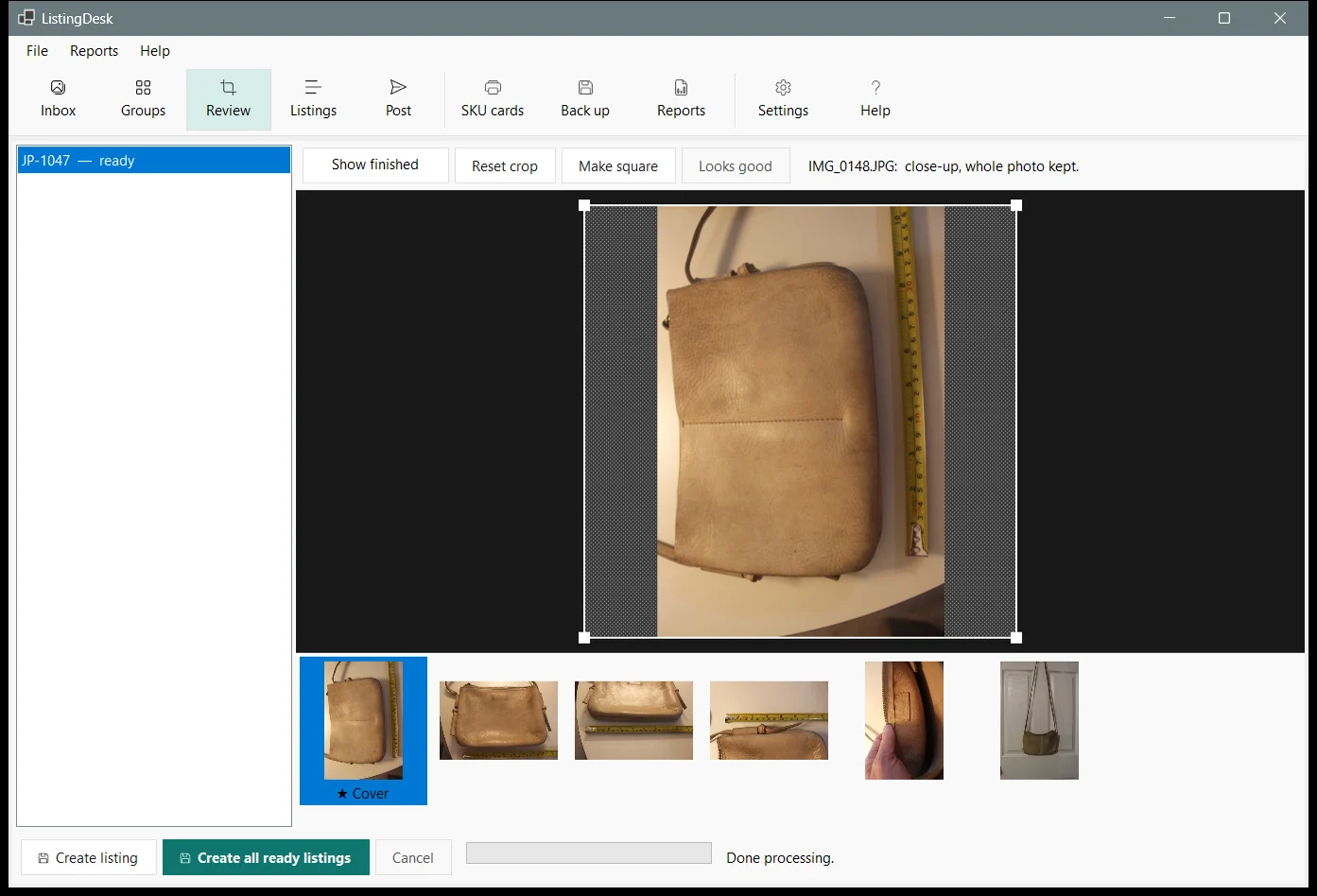
- Local AI finds the item. A background-removal model runs on the PC’s own processor (no graphics card, no cloud service, no per-photo fee) to find the item in every photo. The app then crops a square around it with padding, so handbag edges and straps stay in the frame, and balances the light against the backdrop.
- Marketplace-ready files. Each photo is exported as a 2048 pixel square JPEG with the camera metadata (including any location) stripped.
- Originals are never changed. The original photos are archived only after the export is verified, and they are never edited or deleted.
3. AI research, reviewed once
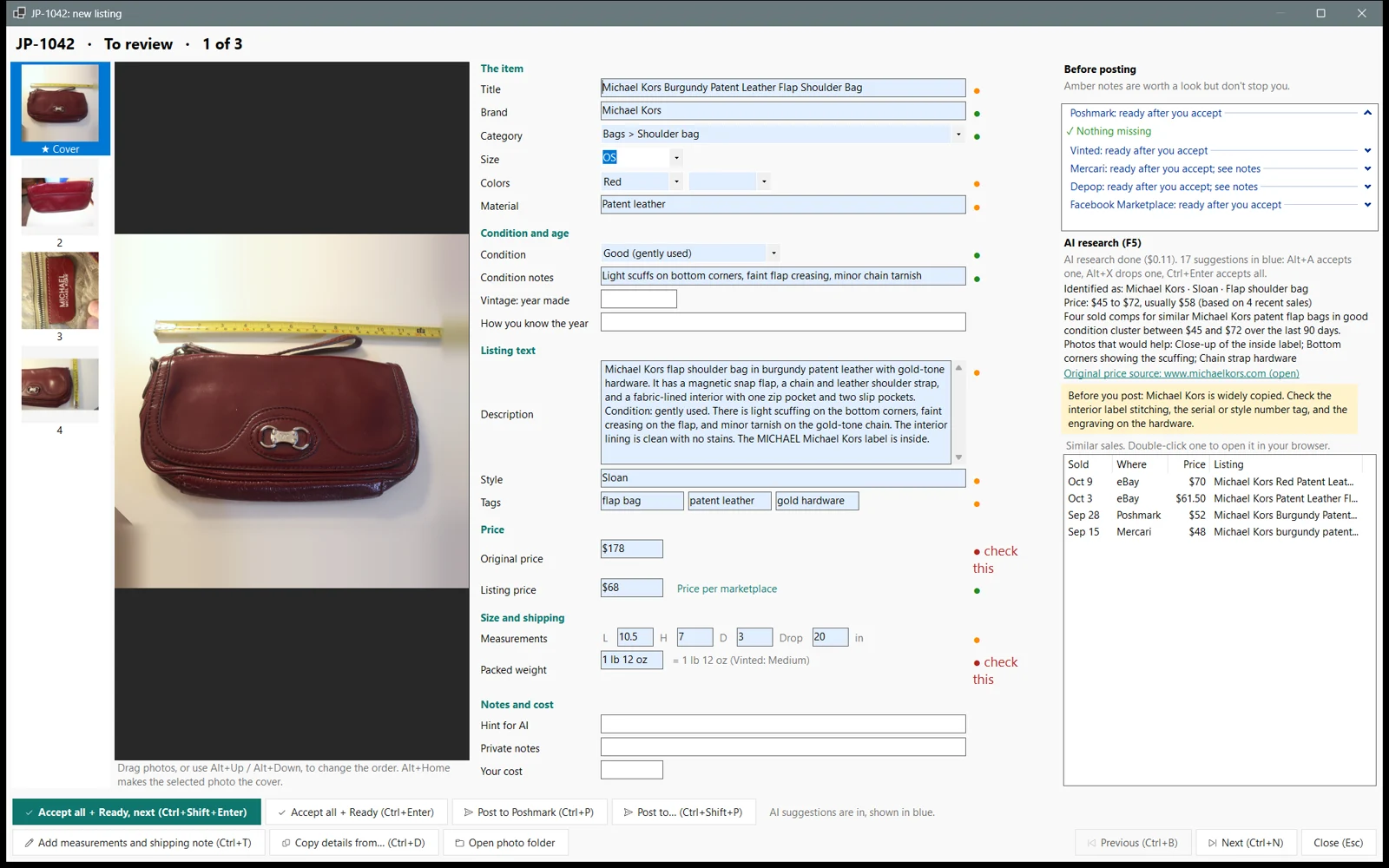
As soon as a listing is created, AI research starts on its own in the background. ListingDesk sends Anthropic’s Claude up to six photos (downscaled, metadata stripped), any hint the seller typed, and the fields the seller already filled in. Claude reads the tags and labels, searches the web for the style, its original retail price, and recent sold prices, and drafts every field it can: title, description, brand, category, size, condition and flaws, colors, material, tags, measurements from a tape-measure photo, shipping weight, and a price range with the reason behind it.
- Suggestions, not decisions. Every AI value appears in blue until the seller accepts it, with a dot for how sure the AI is: green for confident, amber for take a look, red for check this. One key accepts a field, one turns it down, and one asks for another idea.
- Typing always wins. Anything the seller types is never overwritten by AI again.
- No authenticity claims. The AI never states or implies that an item is authentic. For brands that are widely copied, it reminds the seller what to check before posting.
- Private things stay private. The seller’s cost, private notes, and file paths are never sent to the AI or to any marketplace. Tests check this.
- One keystroke to finish. Ctrl+Shift+Enter accepts every suggestion, marks the listing Ready, and opens the next one. If any red “check this” values are showing, it stops once so the seller looks at them first.
4. Posting, with the seller’s hand on the button
Each marketplace is handled the safest way it allows:
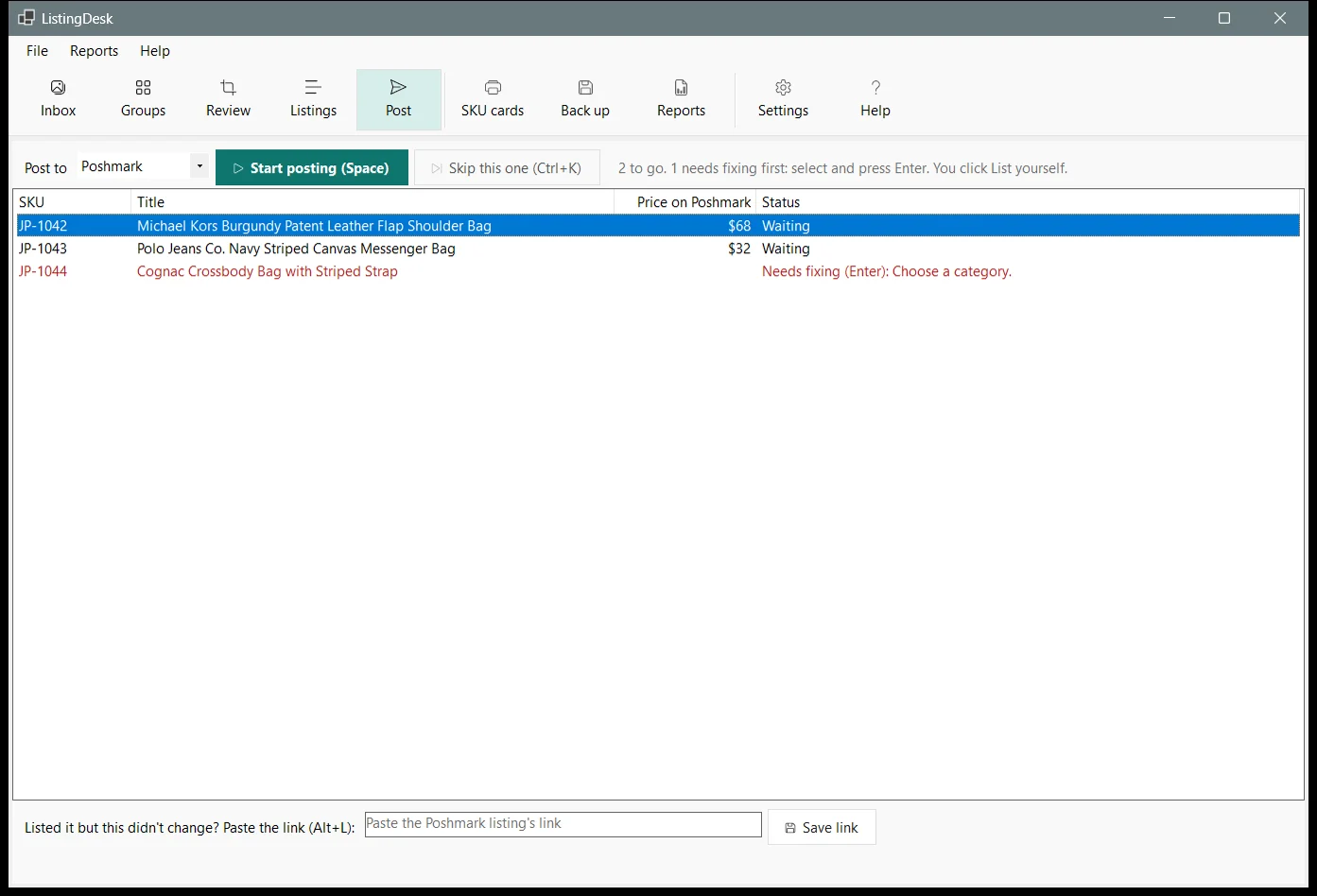
- Poshmark: a small ListingDesk extension in the seller’s own Chrome fills the create-listing form, photos included. A box on the page lists anything to check, and the seller reviews the form and clicks List. ListingDesk notices the new listing, records its link, and opens the next item.
- Mercari: a copy panel, or form filling like Poshmark behind a setting that is off by default.
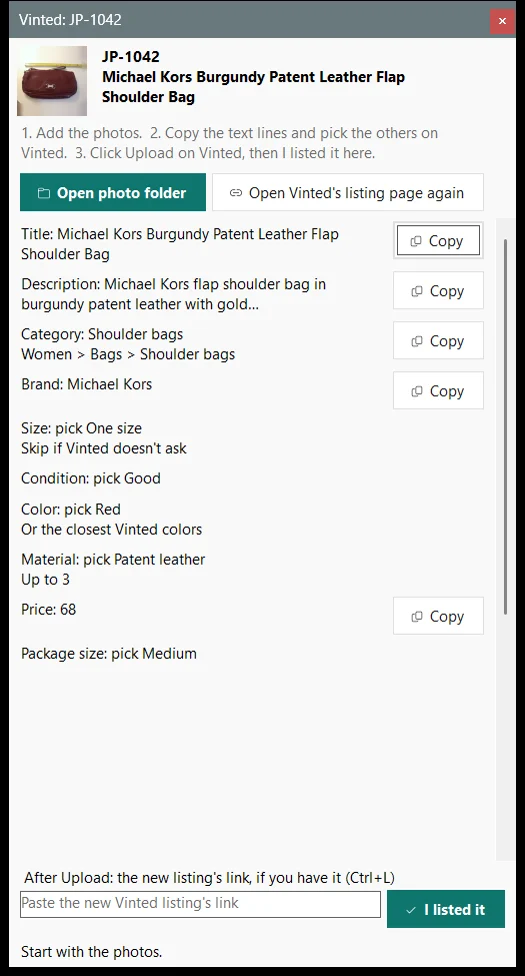
- Vinted, Depop, and Facebook Marketplace: a copy panel. ListingDesk never fills these sites, and the extension does not run on them.
- Etsy: a copy panel for vintage items (20 or more years old). The AI can suggest the year made with its evidence, and the seller confirms it.
- eBay (coming): posting through eBay’s official API, after the seller confirms a preview in the app, one listing at a time. It waits on eBay developer approval.
The Post tab works through every Ready item for one marketplace: press Space, review, click the marketplace’s button, and the next one opens. The copy panel stays at the edge of the screen with each field in that marketplace’s own form order, a Copy button per line, and a button that opens the photos numbered in the seller’s order.
5. Prices, sales, and taking it down everywhere else
- A price for each marketplace. One listing price works everywhere by default. A rule in Settings, such as 10% less on a marketplace where buyers pay the fee, rounded to whole dollars or to .99, sets the others, and a price the seller types for one item on one marketplace always wins.
- Mark sold, with Undo. The seller records where it sold, the price, and the date.
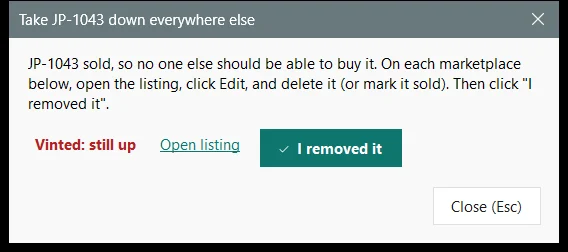
- A take-down checklist. If the item is still up anywhere else, a short checklist opens straight away with a link to each listing. A sold item that is still up somewhere is flagged until it is down.
6. Reports and analysis that answer real questions
The local database knows what the seller has, where it is listed, and what has sold, so the reports can answer the questions a reseller actually asks. Each report is a PDF the app opens and keeps:
- Inventory, sales and profit, and needs attention: everything on hand by status, what sold each month and on each marketplace with the profit after the seller’s cost and the marketplace’s estimated fee, and the items waiting for review, missing something, or sold but still listed somewhere.
- Usage and time saved: how many items were prepared, researched, listed, and sold each month, and an estimate of the time ListingDesk saved, valued at the seller’s own hourly rate.
- Cost to run and savings: what AI research cost each month, per item researched, per listing posted, and per sale; and the time saved plus what a subscription crosslisting service would have cost, minus that AI cost.
- Marketplace analysis: sell-through, days to sell, estimated fees, and profit for each marketplace, category, and brand, and the best marketplace for each: the one with the highest average payout after estimated fees, once a marketplace has at least three sales in that group.
Fees are estimates from each marketplace’s published fee rules, applied to the sold price; the reports say so. Every report and export opens a filter first (status, marketplace, category, brand, a date range, or a search) that shows how many listings match and remembers the last choice. The same data exports to an Excel workbook or a CSV file, and a one-click backup saves the listings, settings, and finished photos in one zip file for a USB drive. Backups never contain the AI key or the extension’s pairing code.
7. Privacy, safety, and cost control as features
- The seller’s data stays on the seller’s PC. Listings live in a local database, photos in a local folder. There is no ListingDesk cloud account.
- No marketplace passwords, ever. The app never asks for, stores, or handles them. It works inside the seller’s own logged-in Chrome.
- No bots. No sharing, following, offers to likers, or relisting on a schedule. No hidden automation, faked browser identity, proxies, CAPTCHA solving, or unattended posting.
- Secrets encrypted. The AI key is encrypted with Windows’ own data protection for the seller’s Windows account, never logged, and never in a backup.
- A locked-down link to Chrome. The app and the extension talk only on the PC itself, and every request needs a pairing code.
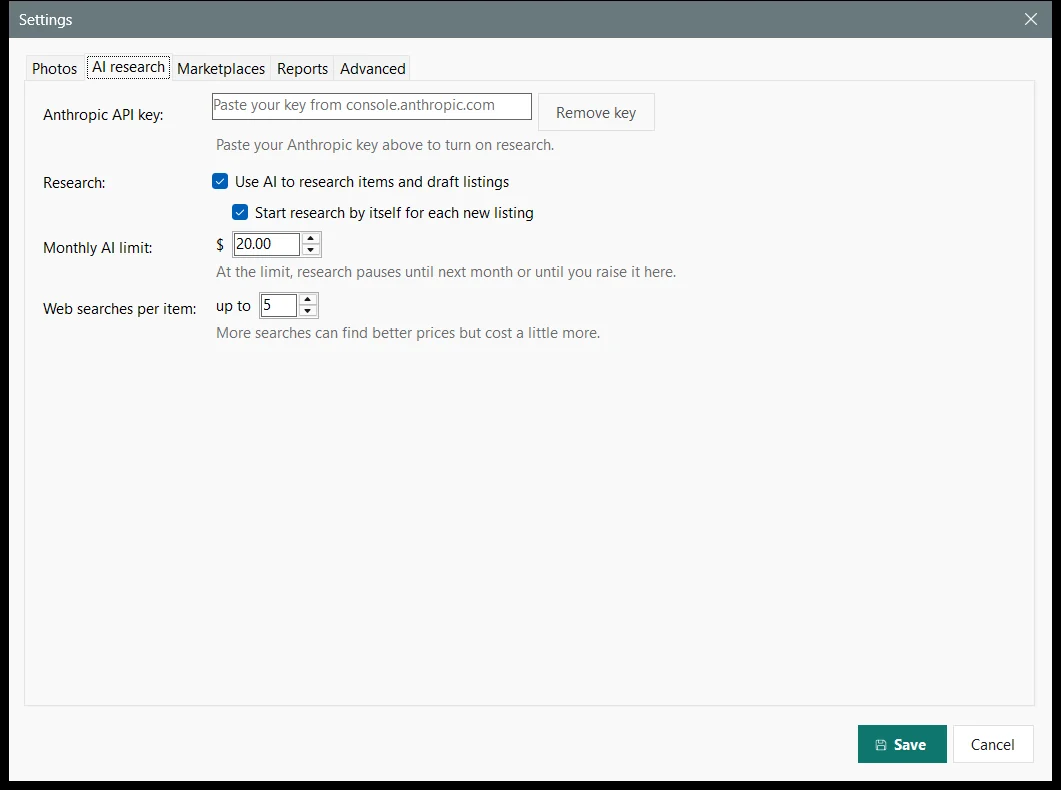
- A monthly AI limit. $20.00 by default, which covered about 50 items at the measured cost. Research warns at 80% and pauses at the limit until next month or until the seller raises it. With two research workers running, a month can go over by about one item’s research, so I also recommend a matching limit in the seller’s Anthropic account.
- An audit trail. Every change, sale, and posting is logged. A log viewer shows it, and an error offers a one-click report to PTS support that leaves out notes, costs, and passwords.
8. What the measurements show
Before trusting AI with real listings, I ran it live on a sample shoot of 13 real items, mostly handbags and wallets, and checked each reply by hand against what the photos show.
Most of the typing done, with the limits stated
| Measure | Target | Result |
|---|---|---|
| Fields filled by AI | At least 80% on the sample set | Met: 91.2% average across all 13 items (79% to 100% per item) |
| Brand | Correct wherever a label is visible | Both items with a known brand named correctly; all 5 unbranded items correctly left blank |
| Authenticity | No claims | Met: no reply says an item is authentic. A bag with a movie-promotion tag naming a designer brand was correctly not listed as that brand |
| Titles | Within Poshmark’s 80 characters | Met: 13 of 13 (54 to 75 characters) |
| Cost | Under the $20.00 monthly limit | $4.99 for 13 items, $0.38 average ($0.09 to $0.49 per item) |
| Prices | Backed by recent sales | Not met: all 13 prices were labeled honestly as estimates; no recent sold listings were found to back them |
| Measurements | Read from a tape photo | Partly: 5 of 13 items; the rest had the tape beside the bag rather than along it, and the AI left them blank instead of guessing |
| Materials | No unsupported claims | One miss: an ostrich-embossed wallet called ostrich. The instructions were tightened; the 6 items run after the change made no such claims |
| Automated tests | 462 app tests and 76 Chrome extension tests passing, including checks that the extension never clicks a final button and that cost and notes never leave the app | |
Photo preparation took about 12 seconds per photo on an eight-core desktop. It runs in the background, so the seller can review one item while later ones are still processing.
Time saved is an estimate. The Time saved report counts real activity from the database and multiplies it by stated assumptions of how long each step takes by hand: 1 minute per photo prepared, 12 minutes per item researched, half a minute per AI suggestion accepted instead of typed, 6 minutes per marketplace form filled, and 3 minutes per listing posted from a copy panel. By those assumptions, an item with five photos and fifteen accepted suggestions, filled on Poshmark and copied to one more marketplace, saves about 34 minutes. The report prints its assumptions so the seller can judge them, and values the time at an hourly rate the seller sets.
9. How it differs from subscription crosslisters
Crosslisting services are a well-established category, and many sellers are well served by them. They are typically cloud services billed monthly; the vendor pricing pages I checked in October 2026 listed plans from about $13 to $99 or more a month. Many add automation such as sharing and offers, and some detect sales on their own. ListingDesk makes different trade-offs on purpose:
- Local. The listings, photos, and records live on the seller’s PC, not in a vendor’s cloud.
- No app subscription. ListingDesk needs no subscription of its own. The running cost is AI research on the seller’s own Anthropic account, capped by the monthly limit.
- No bots. ListingDesk does none of the closet automation that some marketplaces’ rules restrict.
- The seller stays in control. Every final click is the seller’s. ListingDesk does not detect sales on browser marketplaces by itself; the seller marks an item sold, and the take-down checklist does the remembering.
10. The ListingDesk path
- Shoot. Photograph the SKU card, then the item: front, back, sides, inside, every tag, any flaws, and a tape measure for bags.
- Prepare. Copy the photos to the Inbox, check the groups, and process them. Check the square crops and create the listings.
- Research. AI researches each new listing in the background and drafts every field it can, with sources and confidence.
- Review once. Accept, edit, or turn down each suggestion, then mark the listing Ready with one keystroke.
- Post. Work through the Ready items for one marketplace at a time. Review each form or copy panel, and click the marketplace’s final button yourself.
- Sell. Mark it sold, take it down everywhere else from the checklist, and let the reports show what sold where and what it earned.
Sources
- Parker Technology Solutions: ListingDesk product requirements, architecture, and user manual 1.0 (October 2026).
- Parker Technology Solutions: ListingDesk AI research results, live run on the 13-item October 16 sample set, including fields filled, cost, and every quality problem found (October 22, 2026).
- Parker Technology Solutions: ListingDesk milestone and status records, including automated test counts and independent code, security, and usability review findings (October 2026).
- Parker Technology Solutions: survey of crosslisting tools’ published pricing and features, from vendor pricing pages (checked October 23, 2026).